Winner-by-Category
| Category | Winner |
|---|---|
| Best free plan | Bitwarden |
| Best UX & polish | 1Password |
| Best security record | Tie |
| Best for families | 1Password |
| Best for businesses | 1Password |
| Best for developers | 1Password |
| Best price | Bitwarden |
| Overall | 1Password |
1Password and Bitwarden are the two password managers worth genuinely considering in 2026. They take fundamentally different approaches: 1Password is a polished, design-led commercial product with a unique Secret Key architecture and a never-been-breached track record; Bitwarden is open-source, transparent, with a generous free tier and bargain-priced paid plans. The right answer depends on what you actually care about. This guide compares them on pricing, security, user experience, family plans, business tooling, and migration — and gives you a clear recommendation for each of the most common scenarios.
Heads up — some links on this page are affiliate links. If you start a 1Password subscription through them, OnePass Deals earns a small commission at no extra cost to you. We only recommend tools we'd happily pay for ourselves.
1Password vs Bitwarden — Quick Verdict
Pick 1Password if you value design polish, you want the easiest family setup, you're a developer who'll benefit from SSH/Git tooling, or you're rolling out at a business with more than 10 employees. With our 40% new-customer coupon, Individual is $2.40/mo and Families is $3.60/mo for the first year.
Pick Bitwarden if you need a permanently free tier, you're ideologically committed to open-source, you want the absolute cheapest paid plan ($10/year Premium), or you're a single technical user who doesn't need family-sharing polish.
Don't overthink it. Both are excellent. Neither has been breached. You can migrate between them in minutes via CSV export. The cost difference is roughly $20-30/year for individuals — meaningful but not life-changing.
Pricing Compared
| Plan | 1Password | Bitwarden |
|---|---|---|
| Free tier | 14-day trial only (no card) | Yes — unlimited passwords & devices |
| Premium (individual) | $3.99/mo std / $2.40/mo coupon ($28.80/yr) | $10/yr |
| Families | $5.99/mo / $3.60/mo coupon (5 ppl) | $40/yr (6 ppl) |
| Teams / small business | $19.95/mo flat (10 users) | $4/user/mo |
| Business / Enterprise | $7.99/user/mo + free Families | $6/user/mo |
On raw price, Bitwarden wins at every tier — sometimes by a lot. The $10/year Premium plan is famously the best price-per-feature in the category. But the gap narrows considerably once you apply our 40% 1Password coupon: $28.80/year vs $10/year is a $19/year difference, or about $1.60/month. For most adults, that's well within the "pay for what works better" zone.
Security Compared
Both products are excellent here. Both use AES-256 end-to-end encryption with zero-knowledge architecture (neither vendor can read your vault contents). Both undergo third-party penetration tests and publish security white papers. Neither has been publicly breached in their respective operating histories.
The meaningful differences:
- 1Password Secret Key. 1Password adds a unique 128-bit Secret Key to its encryption derivation, generated on-device and never transmitted in plaintext. This means even a full server breach yields encrypted blobs that are mathematically uncrackable without the user's local Secret Key. Bitwarden uses a more standard PBKDF2 / Argon2 derivation based on master password alone — strong, but not the same belt-and-suspenders model.
- Bitwarden is open-source. The full client and server code is publicly auditable on GitHub. Security researchers can verify the implementation; you can even self-host if you want full control over your data. 1Password's code is closed-source, and you trust AgileBits' audits and white papers instead of reading the code yourself.
- Compliance. Both maintain SOC 2 Type II. Both support GDPR, HIPAA BAAs, and standard enterprise compliance frameworks.
The honest summary: 1Password's architecture is slightly more conservative against server-side breaches; Bitwarden's open-source transparency is slightly more conservative against vendor misbehavior. Both are well above the security bar most users actually face.
Feature Comparison Table
| Feature | 1Password | Bitwarden |
|---|---|---|
| End-to-end AES-256 encryption | ✓ | ✓ |
| Zero-knowledge architecture | ✓ | ✓ |
| Secret Key + master password (Two-Key Derivation) | ✓ | — |
| Open-source code | — | ✓ |
| Self-hosting option | — | ✓ |
| SOC 2 Type II | ✓ | ✓ |
| Passkey support (create, save, autofill) | ✓ Excellent | ✓ Good |
| Watchtower / breach monitoring | ✓ | ✓ (Premium) |
| Travel Mode | ✓ Unique | — |
| Secure sharing with non-users (expiring links) | ✓ | ✓ (Send) |
| SSH agent | ✓ | — |
| Git commit signing | ✓ | — |
CLI (op / bw) | ✓ Polished | ✓ |
| TOTP / 2FA code generator | ✓ (all plans) | ✓ (Premium only) |
| Document storage | 1 GB (Personal) / 5 GB (Business) | 1 GB (Premium) |
| Unlimited devices | ✓ | ✓ (even on Free) |
| Browser extensions (Chrome/Safari/Edge/FF/Brave) | ✓ | ✓ |
| Native apps (macOS/iOS/Win/Android/Linux/watchOS) | ✓ | ✓ |
| SSO unlock (Business) | ✓ | ✓ (Enterprise) |
| SIEM streaming (Splunk, Elastic, etc.) | ✓ | — |
User Experience & Apps
This is where 1Password earns its premium. The macOS, iOS, and Windows apps are best-in-class — fast, beautiful, with deeply considered details like Universal Autofill, system-wide keyboard shortcuts, and Apple Watch quick-access. The browser extensions handle autofill on virtually every site we've tested, including notoriously tricky single-page apps and legacy banking portals. Onboarding is genuinely friendly to non-technical users.
Bitwarden's apps are functional and improving but visibly more utilitarian. The Bitwarden browser extension is the place where the experience gap shows up most often — autofill is reliable but the UX is more "checklist of fields" than "magic happens." For technical users, this is fine. For your parents or non-technical partner, 1Password is meaningfully easier to live with.
Family Plans Compared
1Password Families: $3.60/mo with our coupon ($43.20/yr) for up to 5 people. Built-in account recovery (the family organizer can help a forgetful member back in). Polished invitation flow. The de facto standard for non-technical households.
Bitwarden Families: $40/yr for up to 6 people — basically the same price. Includes Premium for everyone. No native "account recovery by organizer" feature in the same friction-free way 1Password offers. Better if you have a 6th household member from day one; otherwise the convenience features tilt toward 1Password.
For most families, this is closer to a flip than the per-user pricing suggests. If your household is technical and cost-sensitive, Bitwarden Families is great. If you have non-technical members, 1Password Families is worth the small premium.
Business Plans Compared
1Password Business ($7.99/user/mo): SSO, SCIM, SIEM streaming, advanced reporting, 20 guest accounts, and the killer perk — a free Families plan for every employee ($71.88/year value per seat). This last benefit is the reason 1Password Business deployments tend to stick: it drives at-home adoption, which drives at-work muscle memory, which drives actual usage of the tool you're paying for.
Bitwarden Teams ($4/user/mo) and Enterprise ($6/user/mo): meaningfully cheaper per seat. SSO available on Enterprise. No free Families equivalent. Self-hosting option remains a draw for security-conscious orgs with the engineering bandwidth to run it.
For small teams with strong technical IT, Bitwarden saves real money. For mid-market and larger, 1Password Business's free Families plan benefit usually closes the cost gap once you factor in the employee benefit value — and the lower IT support burden tips the total-cost-of-ownership decisively toward 1Password.
Migration — How Easy Is It to Switch?
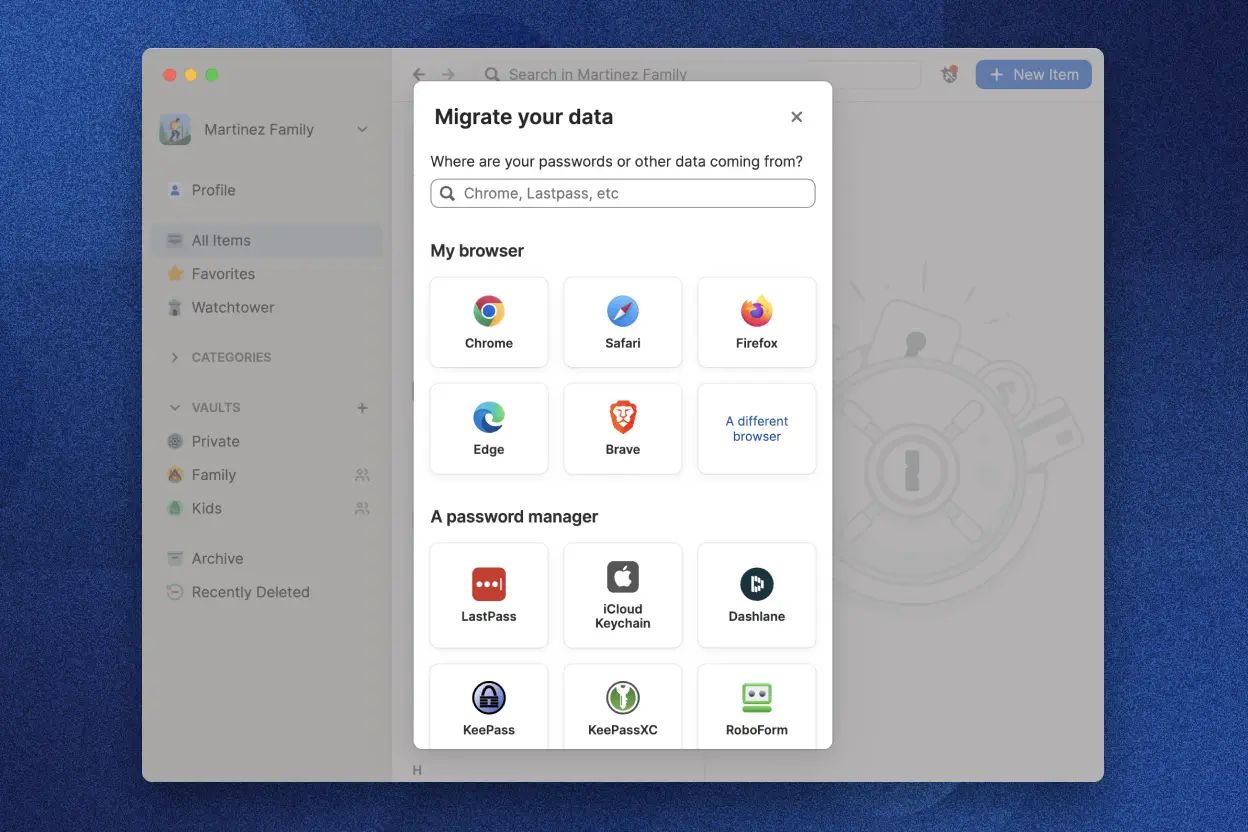
Migration in either direction is fast and lossless. Both products support full CSV import/export, and both have built-in importers that recognize the other's native format. The actual migration steps:
- In the source manager, export everything to CSV (or the proprietary format if available).
- In the destination, use the built-in import wizard and select the source's format.
- Review the imported items, then immediately run a breach scan (Watchtower in 1Password, Reports in Bitwarden Premium).
- Update any items that didn't import cleanly (rare; usually file attachments or very old custom field types).
- Delete your account on the source manager after a 30-day grace period to ensure nothing was missed.
Total migration time for a typical 200-item vault: 15-30 minutes including the breach-scan cleanup. Don't let "migration friction" be the reason you stay on the wrong tool.
When to Pick Bitwarden Instead
We recommend Bitwarden over 1Password when:
- You absolutely need a free tier (Bitwarden Free is fully usable forever)
- You're a developer or sysadmin who values open-source code you can audit
- You want to self-host your password manager (Bitwarden supports this, 1Password does not)
- You're a solo technical user and the $10/year Premium price is hard to argue with
- Your team is under 25 people and IT can handle the slightly rougher onboarding
Final Verdict — Who Wins for You?
For most readers, 1Password is the right pick — especially with our 40% coupon, which closes most of the price gap. You get a more polished product, better family management, the Secret Key architecture, Travel Mode, first-class passkey support, and a 20-year never-breached track record. The $20-30/year you pay extra over Bitwarden Premium buys real day-to-day quality-of-life improvements and meaningfully higher non-technical-user adoption (which matters enormously if you're sharing with family or rolling out at work).
For cost-conscious solo technical users, Bitwarden Premium at $10/year remains an absolute bargain and the right answer. For everyone else who got this far: claim the 1Password 40% coupon, start the 14-day no-card trial tonight, and import your existing vault. You can always migrate back to Bitwarden in 15 minutes if it isn't for you.
Try 1Password Risk-Free for 14 Days
No credit card. Full features. If you subscribe, our coupon locks in $2.40/mo Individual or $3.60/mo Families for the first year.
Start Free 1Password Trial1Password vs Bitwarden FAQs
For most users, yes. With our 40% coupon, 1Password Individual is $2.40/mo — roughly the cost of one coffee per month for meaningfully better UX, the Secret Key architecture, Travel Mode, passkey portability across platforms, and the best family-sharing experience in the category. If $28.80/year is hard to justify, Bitwarden Free is genuinely usable; if not, 1Password is the better daily-driver tool.
"Safer" is the wrong frame. Bitwarden's open-source code is more auditable, which is a security plus. 1Password's Secret Key architecture is more conservative against server breaches, which is a different security plus. Both have clean public breach records. Neither is meaningfully less safe than the other; you're choosing which threat model to optimize for.
Technically yes, but it's a bad idea for normal use. Having two password managers fighting for autofill creates inconsistent behavior, doubles your maintenance overhead, and defeats the purpose of consolidating credentials in one place. The exception: some technical users run one manager for personal accounts and a separate one (often a self-hosted Bitwarden or Vaultwarden instance) for highly sensitive infrastructure secrets. For 99% of users, pick one and commit.
Effectively yes for standard items (logins, secure notes, credit cards, identities). File attachments and custom field types occasionally need manual cleanup. Plan for 15-30 minutes for a typical 200-item vault, including a breach-scan pass on the destination. Keep your source account active for 30 days after migration as a safety net.
1Password's passkey implementation is more mature and polished in 2026, with consistent cross-browser autofill and a clean UI for managing multiple passkeys per site. Bitwarden's passkey support is solid and improving but feels slightly more first-generation. If passkey workflows matter to you, 1Password is the better current choice — though Bitwarden is closing the gap fast.