1Password Business is a $7.99/user/month (billed annually) enterprise-grade password manager used by over 100,000 organizations including Slack, IBM, Shopify, Under Armour, and PagerDuty. Every seat includes SSO unlock (Okta, Entra ID, OneLogin, Duo, Google Workspace), SCIM provisioning, SIEM streaming to Splunk, Elastic, Sumo Logic, and Panther, advanced admin reporting, 5 GB of document storage per user, and — uniquely in the market — a free 1Password Families plan for every employee (a $71.88/year value per seat). There's a 14-day free trial for teams of any size, a pro-rated refund window in the first month, and dedicated implementation support for rollouts above 50 seats.
Heads up — some links on this page are affiliate links. If you start a 1Password subscription through them, OnePass Deals earns a small commission at no extra cost to you. We only recommend tools we'd happily pay for ourselves.
What Is 1Password Business?
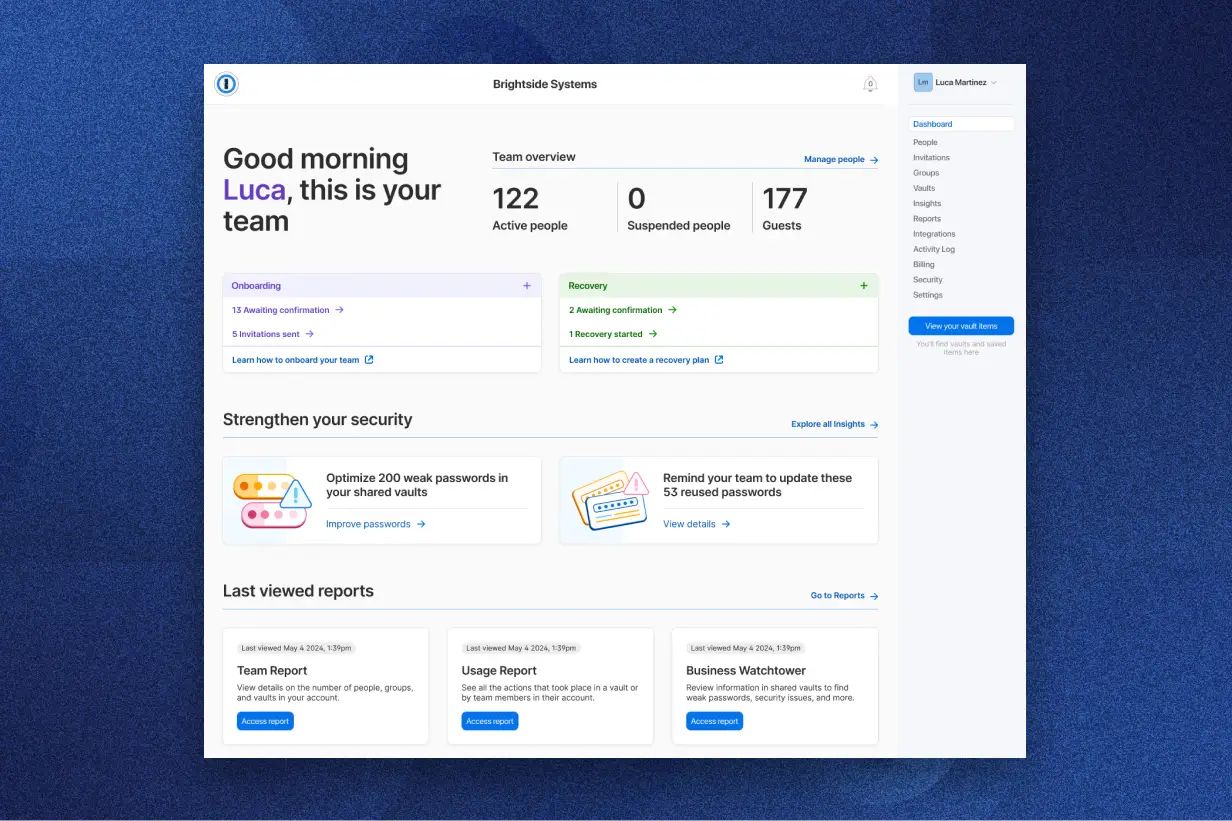
1Password Business is AgileBits' core enterprise offering — the password manager you deploy when you've outgrown ad-hoc credential sharing (shared spreadsheets, browser saved passwords, "let me Slack you the API key"). It runs on the same Two-Key Derivation security architecture as the personal product: every vault is end-to-end encrypted on the device using a key derived from both the user's master password and their unique Secret Key, neither of which AgileBits stores. The Business tier layers on the controls IT and security teams need: single sign-on, automated provisioning, audit logging, compliance reporting, and integrations with the SIEM platforms your SOC already runs. It's used at companies from 10-person startups all the way through Fortune 500 deployments.
1Password Business Pricing
| Line Item | Cost |
|---|---|
| Per user, per month (billed annually) | $7.99 |
| Per user, per year | $95.88 |
| Free Families plan per employee (value) | $71.88/yr |
| Effective net cost per seat (after Families value) | ~$24/yr |
| Free trial | 14 days, no credit card |
| Minimum seats | None for Business; Enterprise is custom |
| Volume discount | Available — contact sales above 100 seats |
If you'd been planning to reimburse employees for personal password managers anyway (many security-forward companies do), the free Families plan effectively turns 1Password Business into a $24/year/employee tool — easily the best price-per-feature in the enterprise password-manager category.
The Killer Perk — Free Families Plan for Every Employee
This is the feature no other enterprise password manager matches and the reason 1Password Business deployments tend to stick. Every single seat on 1Password Business includes a free Families plan for that employee — meaning they get to share 1Password with up to 4 other people at home (partner, kids, parents), all on the company's dime, with no extra billing to you.
Why does this matter for the business itself? Because most credential theft happens on personal accounts, not corporate ones. An employee whose personal Gmail gets phished doesn't just lose their personal data — they often lose the recovery email for their corporate accounts too, hand over the same password they reused at work, or get socially engineered through their personal channels into compromising work systems. By giving employees a great password manager for personal life, you eliminate the weakest link in your corporate security posture and dramatically increase day-to-day 1Password usage (because muscle memory at home transfers to muscle memory at work). The math: $71.88/year of value per employee, free, that you'd have to pay separately to give them. It's the rare benefits perk that genuinely improves your security ROI.
1Password Teams Starter Pack vs Business — Which to Choose?
The decision usually comes down to size and SSO requirements.
| Need | Teams Starter Pack | Business |
|---|---|---|
| Users covered | Up to 10 flat-rate (then per-seat to 20) | Unlimited per-seat |
| Price | $19.95/mo flat | $7.99/user/mo |
| Shared vaults & basic admin | Yes | Yes |
| SSO unlock (Okta, Entra ID, etc.) | — | ✓ |
| SCIM provisioning | — | ✓ |
| SIEM streaming | — | ✓ |
| Advanced reporting | — | ✓ |
| Free Families per seat | — | ✓ |
| Guest accounts | 5 | 20 |
Pick Teams Starter Pack if you have under 10 people, don't need SSO, and just want shared vaults for the team. Pick Business if you have 10+ people, you're growing fast, you need SSO/SCIM/SIEM, or you want the free Families plan benefit for employees. For most companies past 8-10 employees, Business is the right choice because the SSO and provisioning savings alone (no manual user adds/removes) usually outweigh the per-seat cost increase.
Enterprise Integrations
SSO (Okta, Entra ID, OneLogin, Duo, Google Workspace)
1Password Business supports SSO unlock via Okta, Microsoft Entra ID, OneLogin, Duo, and Google Workspace. Users authenticate to 1Password using their existing corporate identity, which means: no separate master password for IT to manage, automatic deprovisioning when a user is removed from the IdP, and centralized MFA enforcement through whatever your SSO already requires. SSO is included in the base Business price — there's no SSO tax.
SCIM Provisioning
SCIM 2.0 provisioning integrates with Azure AD, Okta, OneLogin, Rippling, and JumpCloud, automating user lifecycle management. New hires get a 1Password account the moment HR adds them to your IdP; departures lose access automatically. For companies with high turnover or seasonal hiring, this alone justifies moving from Teams to Business — manual user provisioning is one of the most error-prone tasks in IT, and SCIM eliminates it.
SIEM Streaming (Splunk, Elastic, Sumo Logic, Panther)
1Password Business streams audit events directly to your SIEM of choice — Splunk, Elastic, Sumo Logic, or Panther. Your SOC sees vault access events, sharing events, admin changes, failed unlock attempts, and Watchtower alerts in the same dashboards as the rest of your security telemetry, correlated against EDR, IdP, and network signals. This is the integration that makes 1Password viable for SOC-2-audited and HIPAA-regulated environments.
Security & Compliance for Procurement Teams
1Password Business is built for procurement diligence. AgileBits maintains SOC 2 Type II certification, undergoes regular third-party penetration tests, runs a public bug-bounty program, and publishes a detailed security white paper covering the Secret Key + master password architecture, key derivation, transit security (SRP), and at-rest encryption (AES-256). For Enterprise customers, AgileBits provides custom DPAs, vendor security questionnaires, and SOC 2 reports under NDA. Compliance certifications include ISO/IEC 27001 alignment, GDPR compliance, and CCPA compliance. The 20-year never-publicly-breached track record is the data point your CISO will care about most — and it's why 1Password tends to clear vendor security review faster than most alternatives.
How to Roll Out 1Password Across Your Company (5-Step Playbook)
- Week 1 — Pilot with IT. Spin up a 14-day trial. Invite the 3-5 person IT or security team. Configure SSO and SCIM against your existing IdP (Okta/Entra). Confirm SIEM streaming is flowing to your SOC dashboards. Document any custom vault structures you'll want to roll out company-wide.
- Week 2 — Pilot with one department. Roll out to one team that has heavy shared-credential needs — Marketing (ad accounts, social logins) or Engineering (deploy keys, SSH credentials, CI/CD secrets) tend to be best. Capture feedback and adjust your vault taxonomy.
- Week 3 — Communicate company-wide. Announce the rollout via internal comms. Highlight the free Families plan benefit — this is your adoption hook. Schedule short (15-minute) lunch-and-learn sessions for each department. Publish a one-page quickstart doc.
- Week 4 — Provision everyone. SCIM auto-provisions all employees in your IdP. Set a deadline for migrating away from any shadow tools (shared spreadsheets, browser saved passwords). Mandatory training for anyone touching sensitive credentials.
- Ongoing — Watchtower & quarterly audit. Run Watchtower org-wide monthly to surface weak/reused/breached passwords. Quarterly: review SIEM logs for unusual access patterns, audit vault membership, rotate any credentials that have been exposed via Watchtower. Update IT runbooks to reference 1Password as the single source of truth for shared credentials.
ROI Calculator
Here's the sample math for a typical mid-market deployment:
| Variable | Value |
|---|---|
| Employees | 50 |
| 1Password Business cost | 50 × $7.99/mo × 12 = $4,794/yr |
| Free Families plan value | 50 × $71.88/yr = $3,594/yr in employee benefits |
| Estimated time saved per employee/week on password resets & sharing | 15 minutes |
| Total time saved per year (50 employees) | ~650 hours/yr |
| Value of time saved at $50/hr loaded cost | ~$32,500/yr |
| Avg cost of a single credential-related breach (industry data) | $4M+ per incident |
Even ignoring breach prevention, the productivity gains alone typically deliver 5-7× ROI on the subscription cost within the first year. Add the free Families plan benefit, factor in security incident reduction, and 1Password Business is one of the highest-ROI security investments most companies will make.
1Password Business vs Bitwarden Teams
Bitwarden Teams is $4/user/mo billed annually — meaningfully cheaper per seat than 1Password Business. What you give up: the free Families plan per employee (a $71.88/year per-seat value), the polish and onboarding ease, the more mature SIEM integrations, and the longer never-breached track record. Bitwarden is open-source, which some security teams prefer. For cost-conscious companies under 50 seats where IT has the bandwidth to do hand-holding through onboarding, Bitwarden Teams is a defensible pick. For most companies above 25-30 seats where employee adoption and IT efficiency matter more than raw seat price, 1Password Business is the better total-cost-of-ownership choice once you account for the free Families plan and the lower training burden.
Roll Out 1Password Business to Your Team
$7.99/user/mo. SSO, SCIM, SIEM included. Every employee gets a free Families plan worth $71.88/year. 14-day trial, no credit card.
Start Business TrialBusiness Plan FAQs
Yes. The $7.99/user/month price (billed annually) includes every feature: SSO, SCIM, SIEM streaming, advanced reporting, 5 GB document storage per user, 20 guest accounts, 24/7 support, and the free Families plan per employee. There is no SSO tax, no per-feature add-on, and no setup fee. Volume discounts are available above 100 seats — contact sales.
Every Business seat includes a free 1Password Families plan that the employee can use at home with up to 4 family members. It's automatically available — employees claim it from their account dashboard. The personal Families account is fully separate from the corporate account (so personal passwords stay private even from your IT team), and it continues for as long as the employee remains on your Business plan.
Almost certainly. 1Password Business supports SSO unlock with Okta, Microsoft Entra ID, OneLogin, Duo, and Google Workspace. Additional OIDC and SAML providers can be configured for Enterprise customers. SCIM 2.0 provisioning is supported for Azure AD, Okta, OneLogin, Rippling, and JumpCloud.
Yes. AgileBits maintains SOC 2 Type II certification, publishes detailed security architecture documentation, supports BAAs for HIPAA customers, and provides custom DPAs for GDPR and CCPA. The 20-year clean security record and end-to-end encryption architecture mean 1Password Business clears most enterprise security reviews quickly.
If you're using SCIM, the employee is automatically deprovisioned from 1Password the moment they're removed from your IdP — access to all corporate shared vaults is revoked instantly. The employee's personal Families plan (the free perk) continues at no charge to you as long as you keep the Business subscription active, but if they want to keep it after Families is removed, they can subscribe directly. Best practice: rotate any sensitive shared credentials the departed employee had access to as part of standard offboarding.