"The most polished, security-first password manager available — worth the price if you value design and privacy over a free tier."
Pros
- Best-in-class UX
- Never breached in 20 years
- Secret Key + Master Password architecture
- Excellent passkey support
- Travel Mode (unique feature)
Cons
- No free plan (just a 14-day trial)
- Pricier than Bitwarden
- No native VPN bundled
Official 1Password walkthrough — see how vaults, autofill, and Watchtower work in practice.
Heads up — some links on this page are affiliate links. If you start a 1Password subscription through them, OnePass Deals earns a small commission at no extra cost to you. We only recommend tools we'd happily pay for ourselves.
What Is 1Password?
1Password is a cross-platform password manager built since 2005 by AgileBits Inc., a privately-held Canadian software company based in Toronto, Ontario. Its job is conceptually simple: generate, store, and autofill the unique strong passwords, passkeys, credit cards, addresses, software licenses, secure notes, and 2FA tokens that modern life now demands of you. In practice, it's also become a serious tool for developers (SSH keys, Git signing, CLI integrations) and for IT teams (SSO, SCIM, SIEM streaming, advanced reporting). More than 100,000 businesses — including Slack, IBM, Shopify, Under Armour, and PagerDuty — and millions of individuals trust it. What makes 1Password different from competitors isn't a single killer feature; it's the combination of a 20-year clean security record, a unique Two-Key Derivation architecture, and design polish that the open-source alternatives still haven't matched.
Who Should Use 1Password? (And Who Shouldn't)
1Password is the right pick for: anyone who values user experience and design polish as much as raw features, families and households who want one shared system for streaming logins and Wi-Fi passwords, developers who need SSH key management and Git commit signing, and businesses of any size that want to deploy SSO-backed credential management with minimal IT overhead. It's also a great fit if you value never-been-breached track records, because in this category that history matters more than any feature checklist.
You should probably not pick 1Password if: you require a permanently free tier (use Bitwarden Free instead), you want a password manager bundled with a VPN at one price (look at Dashlane or NordPass), or you're a one-person hobbyist storing fewer than 20 passwords and a flat $10/year is hard to beat (again, Bitwarden Premium). Everyone else: 1Password is the safe pick, and our 40% coupon closes most of the price gap with the cheaper alternatives.
1Password Pricing in 2026
1Password offers five plans, all billed annually for personal use. Here's the current 2026 lineup with our verified 40% new-customer coupon applied where eligible:
| Plan | Standard Price | With 40% Coupon | Best For |
|---|---|---|---|
| Individual | $3.99/mo ($47.88/yr) | $2.40/mo ($28.80/yr) | Solo users |
| Families (up to 5) | $5.99/mo ($71.88/yr) | $3.60/mo ($43.20/yr) | Households |
| Teams Starter Pack | $19.95/mo flat (10 users) | $19.95/mo | Small teams |
| Business | $7.99/user/mo | $7.99/user/mo + free Families per seat | 10+ employees |
| Enterprise / MSP | Custom (consumption-based) | Custom | Large orgs / MSPs |
Every plan includes a 14-day free trial with no credit card required and a pro-rated refund window in the first month of any new annual subscription. Personal plans (Individual and Families) are annual-only — there is no monthly billing option in 2026. Business and Enterprise customers get more flexibility, including consumption-based billing for MSPs with no seat minimums.
For most readers, the meaningful decision is between Individual at $2.40/mo and Families at $3.60/mo. The Families plan pays for itself the moment two people use it — even if it's just you and one other person, your effective per-person cost drops to $1.80/mo, which is cheaper than Bitwarden Premium and only slightly more than Bitwarden's $40/year family plan.
1Password Security Architecture
1Password's security model is the single best argument for paying for it. Here's what makes it different.
The Secret Key explained
When you create a 1Password account, the app generates a 128-bit random string on your device — your Secret Key — and stores it locally. This key is never transmitted to 1Password's servers in plaintext. To decrypt your vault, an attacker would need both your master password (which you choose and only you know) and your Secret Key (which exists only on devices you've authorized). Even if AgileBits' servers were fully compromised tomorrow, the encrypted blobs they store would be mathematically useless without your Secret Key. This is what 1Password calls Two-Key Derivation, and no major competitor implements anything quite like it.
Two-Key Derivation
The encryption key that actually unlocks your vault is derived by combining your master password with your Secret Key through a PBKDF2 key derivation function with hundreds of thousands of iterations. This dual-secret derivation is what protects you against both server breaches (where attackers steal encrypted vaults) and password-spraying or credential-stuffing attacks (where attackers try guessed master passwords). One without the other is useless.
SOC 2 Type II and independent audits
1Password maintains SOC 2 Type II certification — the gold-standard audit for software security, availability, processing integrity, confidentiality, and privacy. They undergo annual third-party penetration tests, publish detailed security white papers, and run an active public bug bounty program that pays researchers for responsibly disclosed vulnerabilities. The transparency is unusual in this market and reflects a company that treats security as the product, not a marketing line.
Why 1Password has never been breached
In 20 years of operation, 1Password has had zero publicly disclosed security breaches affecting customer vault data. Compare that to LastPass, which suffered a major 2022 breach in which encrypted vaults were exfiltrated, leading to ongoing credential rotation for millions of users years later. 1Password's clean record isn't luck — it's the direct result of the Secret Key architecture, defensive engineering, and a culture that treats every security report seriously. When you're evaluating password managers, this 20-year track record is the data point that matters most.
Hands-On With 1Password Features
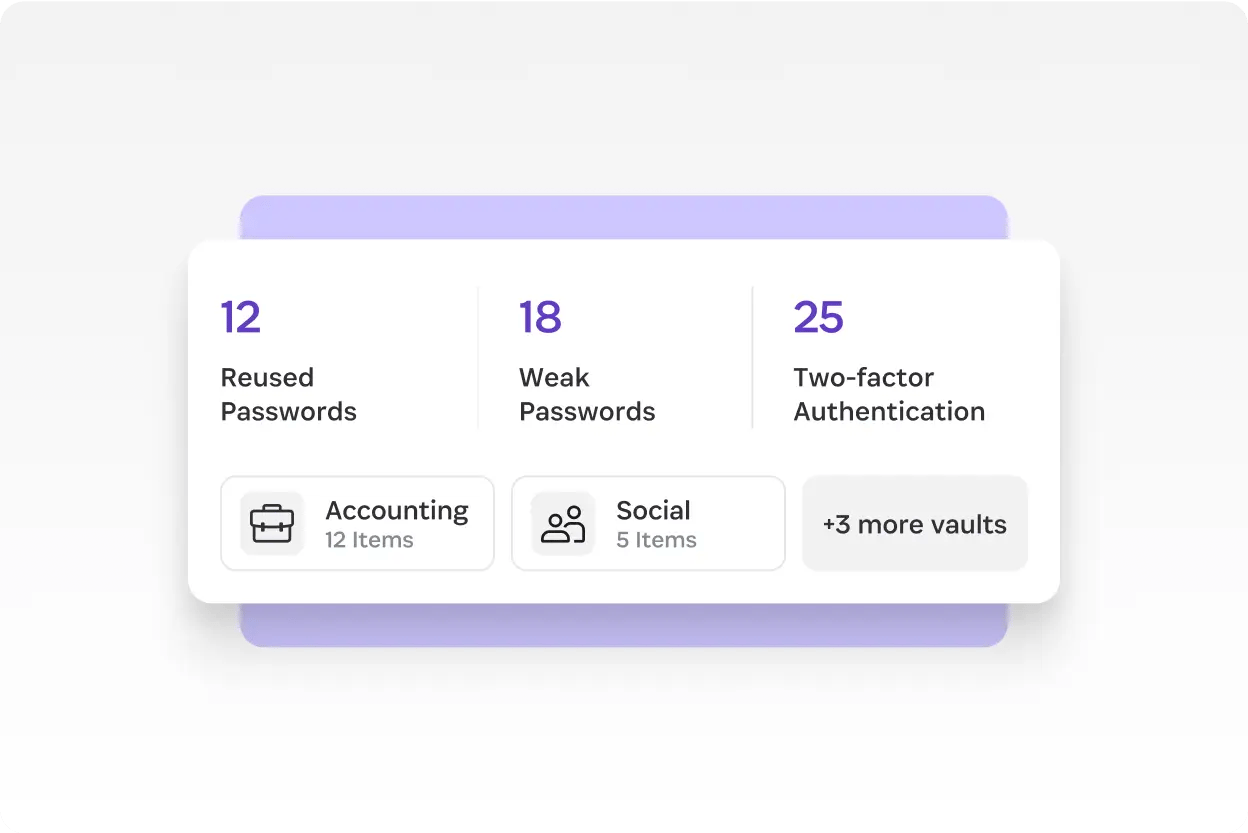
Watchtower — security dashboard that actually saves you
Watchtower is 1Password's built-in security dashboard. It cross-references your saved logins against the Have I Been Pwned breach database and surfaces three categories of problems: passwords that have appeared in known breaches, passwords you've reused across multiple sites, and accounts at sites that support two-factor authentication where you haven't enabled it. Each issue links you straight to the relevant site's password-change page. In testing on our own vaults, Watchtower routinely surfaces 5-15 forgotten breached accounts per user — the kind of stale credentials most people never think to audit. This single feature has, in our experience, paid back the cost of 1Password many times over.
Travel Mode — the killer feature no competitor copies
Travel Mode is unique to 1Password. When enabled, it temporarily removes any vaults you've marked as "non-travel-safe" from all your devices, including the encrypted local copy. If a border agent demands to see your phone, the sensitive vaults aren't merely hidden — they aren't there. You re-enable Travel Mode from any browser at your destination and your vaults sync back down. Journalists, lawyers, activists, and anyone who crosses borders with sensitive client data should be using this; nothing comparable exists in Bitwarden, Dashlane, or NordPass.
Passkeys — first-class support across browsers
1Password offers what is arguably the most polished passkey experience of any password manager in 2026. You can create, save, and autofill passkeys across Chrome, Safari, Edge, Firefox, and Brave — the passkey lives in your encrypted 1Password vault rather than being locked to a single platform's cloud (looking at you, iCloud Keychain). That portability matters: a passkey saved in 1Password works whether you're on your iPhone, your Windows laptop, or your Linux dev machine. As more sites adopt passkeys in 2026, this cross-platform capability becomes one of the most practical reasons to standardize on 1Password.
Secure Sharing — send a password to anyone, even non-1Password users
Need to share the Wi-Fi password with a contractor or a credit card with your partner? 1Password's Secure Sharing generates a one-time link that works for anyone, even people who don't have 1Password. You set the expiry (one hour, one day, 7 days, 30 days) and limit access by email address if needed. The recipient sees only the item you shared, and the link self-destructs on schedule. This sounds minor; in practice, it kills the workflow of "let me just text you the password" — the single worst pattern in personal security.
Developer tools — SSH, Git signing, CLI
If you write code for a living, 1Password's developer tools are reason enough to switch. The built-in SSH agent lets you store SSH private keys in your vault, biometric-unlock them, and use them with any SSH client — no more keys lying unprotected in ~/.ssh/. Git commit signing works the same way: sign every commit with a vault-stored key without ever exposing it. The op command-line tool integrates with shell scripts, CI/CD pipelines, and Docker setups, letting you reference secrets by name rather than pasting them into environment variables. SDKs are available for Node.js, Python, and Go. This is professional-grade tooling that competitors simply don't ship.
1Password Apps & Browser Extensions
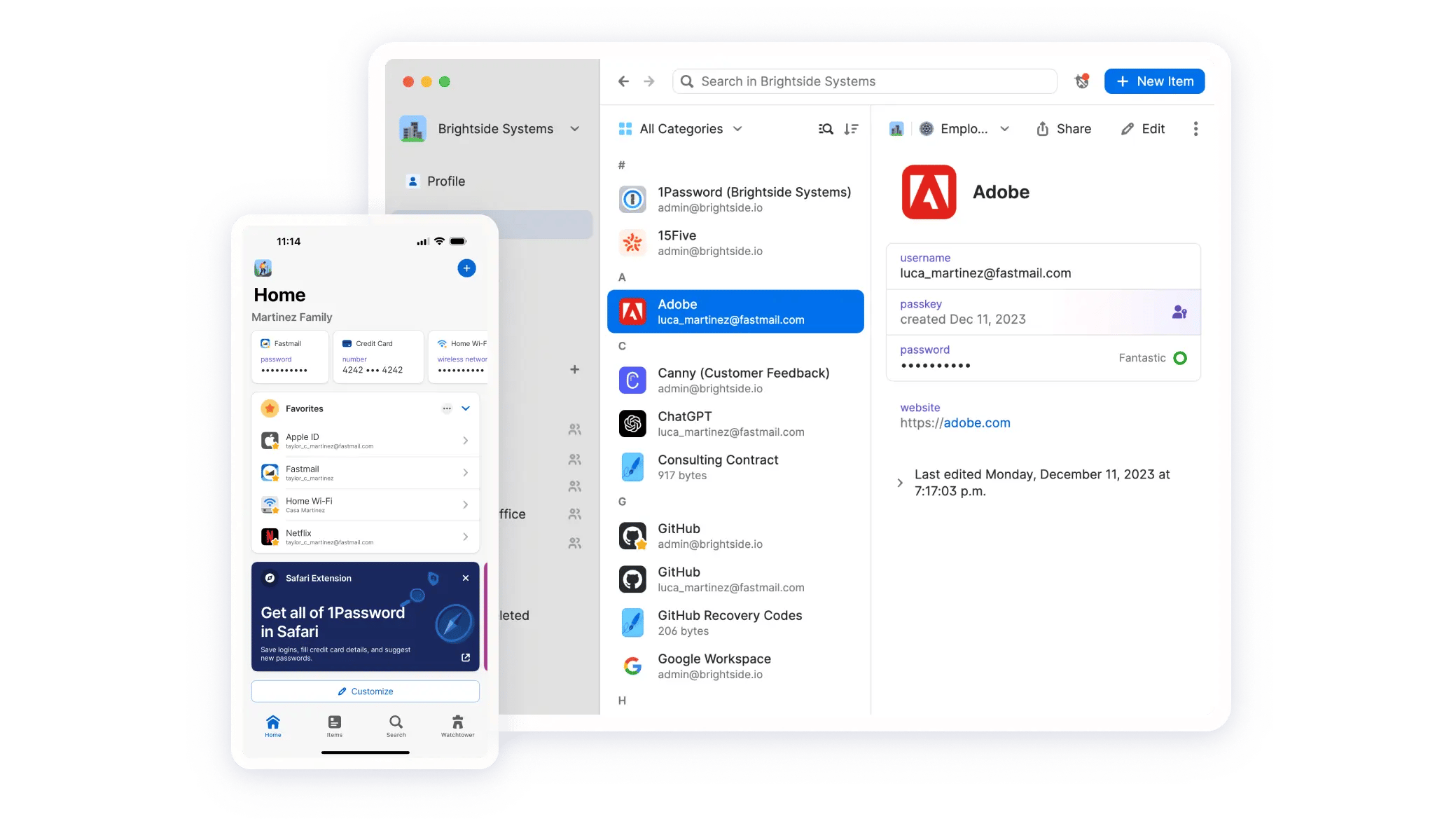
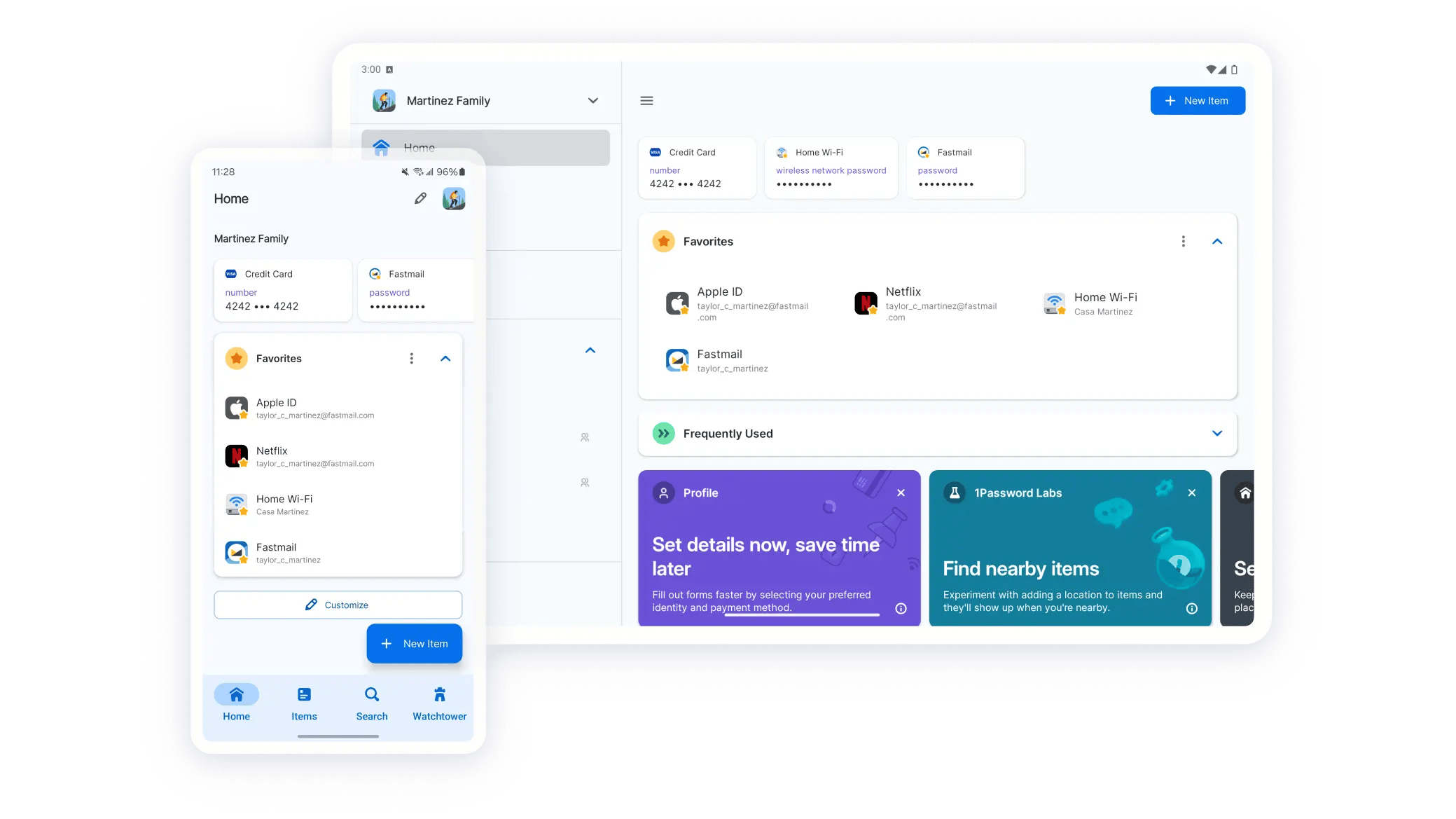
1Password ships native apps for macOS, iOS, watchOS, Windows, Android, and Linux, plus browser extensions for Chrome, Safari, Edge, Firefox, and Brave. The macOS and iOS apps are the most polished — unsurprising given AgileBits' historical Apple focus — but the Windows app has caught up significantly in recent years, and the Linux app is one of the few proper native Electron-free experiences in the category. Sync between devices is near-instantaneous; biometric unlock works flawlessly with Face ID, Touch ID, and Windows Hello. The browser extensions handle autofill, autosave, and password generation on virtually every site we've tested, including notoriously tricky single-page apps and legacy banking portals. The Apple Watch app even lets you copy a TOTP code or look up a Wi-Fi password from your wrist — niche, but genuinely useful.
Customer Support & Community
1Password offers 24/7 email support for all paid plans, along with a deep knowledge base, an active community forum, and a public roadmap. Response times in our experience average under 24 hours for routine questions and substantially faster for security-sensitive issues. Business and Enterprise customers get priority support with dedicated account managers and faster SLA targets. The forum is unusually substantive — staff regularly participate, feature requests are tracked publicly, and you'll often find detailed answers from 1Password engineers to obscure setup questions. There's no phone support, which some enterprise IT teams will note, but for a software product where most issues are configuration-level, the email-plus-forum model works well in practice.
1Password vs. The Competition
1Password vs. Bitwarden
Bitwarden is the strongest case against paying for 1Password. It's open-source, has a genuinely usable free tier, and charges just $10/year for Premium ($40/year for a family of six). What you give up: design polish, the Secret Key architecture, Travel Mode, and the developer tooling. If your priorities are price and transparency, pick Bitwarden. If you value the user experience and family management, pay the extra $30-40/year for 1Password. We have a full 1Password vs Bitwarden comparison if you want the side-by-side.
1Password vs. Dashlane
Dashlane (~$4.99/mo Premium) bundles a VPN into its higher-tier plans, which is a real selling point if you don't already have one. Where 1Password wins: better cross-platform consistency, a stronger family-plan story, better business features, and a longer clean security history. Where Dashlane wins: the VPN bundle and a slightly more aggressive autofill engine on certain sites.
1Password vs. NordPass
NordPass (from Nord Security, the NordVPN folks) is the cheapest premium option on the market at around $1.69/mo on a 2-year plan. The UI is genuinely good and improving fast. The catch: NordPass is newer (launched 2019), has a shorter track record, and the business and developer tooling lag behind 1Password meaningfully. For a price-sensitive solo user who wants something nicer than Bitwarden but doesn't need Travel Mode or developer features, NordPass is a defensible choice.
1Password vs. LastPass (and why we don't recommend LastPass)
LastPass was once the default recommendation in this category. In August 2022, attackers exfiltrated encrypted customer vault backups; subsequent disclosures revealed that the breach was more serious than initially communicated. Years later, security researchers are still tracking cryptocurrency thefts traced back to those leaked vaults. We do not recommend LastPass to anyone in 2026 — the architecture and disclosure history are simply not competitive with 1Password, Bitwarden, or even NordPass. If you're currently on LastPass, our recommendation is to migrate to 1Password or Bitwarden immediately.
Pros and Cons (Expanded)
Pros. 1Password delivers the best overall user experience in the category, full stop. The Secret Key architecture and 20-year never-breached record are unmatched. Watchtower routinely surfaces forgotten security debt. Travel Mode is genuinely unique. Passkey support is cross-platform and best-in-class. The developer tools (SSH agent, Git signing, CLI) are professional-grade. The Families plan at $3.60/mo with our coupon covers up to five people. Business plans include a free Families plan per seat — a benefit no competitor matches.
Cons. There is no permanently free tier, only a 14-day trial. The list price is higher than Bitwarden Premium ($10/yr) and NordPass ($1.69/mo on long-term plans). There's no bundled VPN, which Dashlane and NordPass both offer at higher tiers. None of these are dealbreakers given the 40% new-customer coupon, but they are the legitimate reasons someone might choose a different tool.
Real User Reviews & Ratings
1Password sits at 4.5+ on G2, 4.6+ on Capterra, and around 4.4 on Trustpilot across tens of thousands of verified reviews. The consistency across platforms is striking and reflects something rare in SaaS: a tool people don't just tolerate but actively recommend. Recurring praise focuses on autofill reliability, app polish, family management, and Watchtower. Recurring criticism focuses on the lack of a free tier and occasional Windows-app rough edges (which have improved markedly in recent releases). On Reddit's r/1Password and r/passwordmanagers, the community sentiment skews strongly positive — even users who eventually migrate to Bitwarden for cost reasons typically describe 1Password as the better product.
Final Verdict — Is 1Password Worth It in 2026?
For the vast majority of users, the answer is a confident yes. 1Password is the most polished password manager on the market, paired with the cleanest 20-year security record and a unique Secret Key + master password architecture that genuinely raises the bar against server-side breaches. The headline objections — "it's too expensive" and "Bitwarden is free" — are real but largely defanged by the 40% new-customer coupon, which brings Individual to $2.40/mo and Families to $3.60/mo for the first year. At those prices, you're paying roughly the cost of one coffee a month for what most users will tell you is the single highest-leverage piece of personal infrastructure they own. The 14-day no-card trial means there's no risk in testing it for yourself, and the pro-rated refund inside the first 30 days means even paying isn't truly a commitment. For households of two or more, for any business with 3+ employees, and for developers who'd benefit from SSH and Git integrations, 1Password is the right pick — and the right time to claim the coupon is now.
How to Get 1Password With 40% Off Today
Save 40% on Your First Year of 1Password
Individual drops to $2.40/mo. Families drops to $3.60/mo for up to 5 people. 14-day trial, no credit card. The deal locks in for a full year.
Claim 40% Off Now1Password Review FAQs
For most users, yes — but it depends on what you value. 1Password wins on user experience, family management, business features, passkey support, and developer tooling (SSH agent, Git signing, CLI). Bitwarden wins on price (a genuine free tier, $10/year Premium) and on open-source transparency. If polish, design, and time saved matter more than the $30-40/year difference, 1Password is the right pick. If you're cost-sensitive, technically inclined, or ideologically committed to open-source software, Bitwarden is a perfectly defensible choice. With our 40% coupon, the practical price gap shrinks meaningfully.
Nothing online is truly unhackable, but 1Password's architecture makes a meaningful compromise extremely unlikely. Your vault is encrypted on your device with AES-256 using a key derived from both your master password and your unique 128-bit Secret Key — neither of which AgileBits stores in plaintext. Even a full server breach would yield only encrypted blobs that cannot be decrypted without your local Secret Key. The company has never had a publicly disclosed breach affecting vault data in its 20-year history. Use a strong, unique master password, keep your Secret Key safe (the Emergency Kit PDF is designed for this), and enable two-factor authentication for the ultimate defense.
No. 1Password's business model is subscriptions, not advertising. AgileBits cannot read your vault contents even if they wanted to — the encryption keys never leave your devices in plaintext. Their privacy policy explicitly forbids selling user data to third parties, and they publish a clear stance on responding to government data requests (typically: they can only provide encrypted blobs that are useless without the user's Secret Key). This is one of the strongest privacy stories in the category.
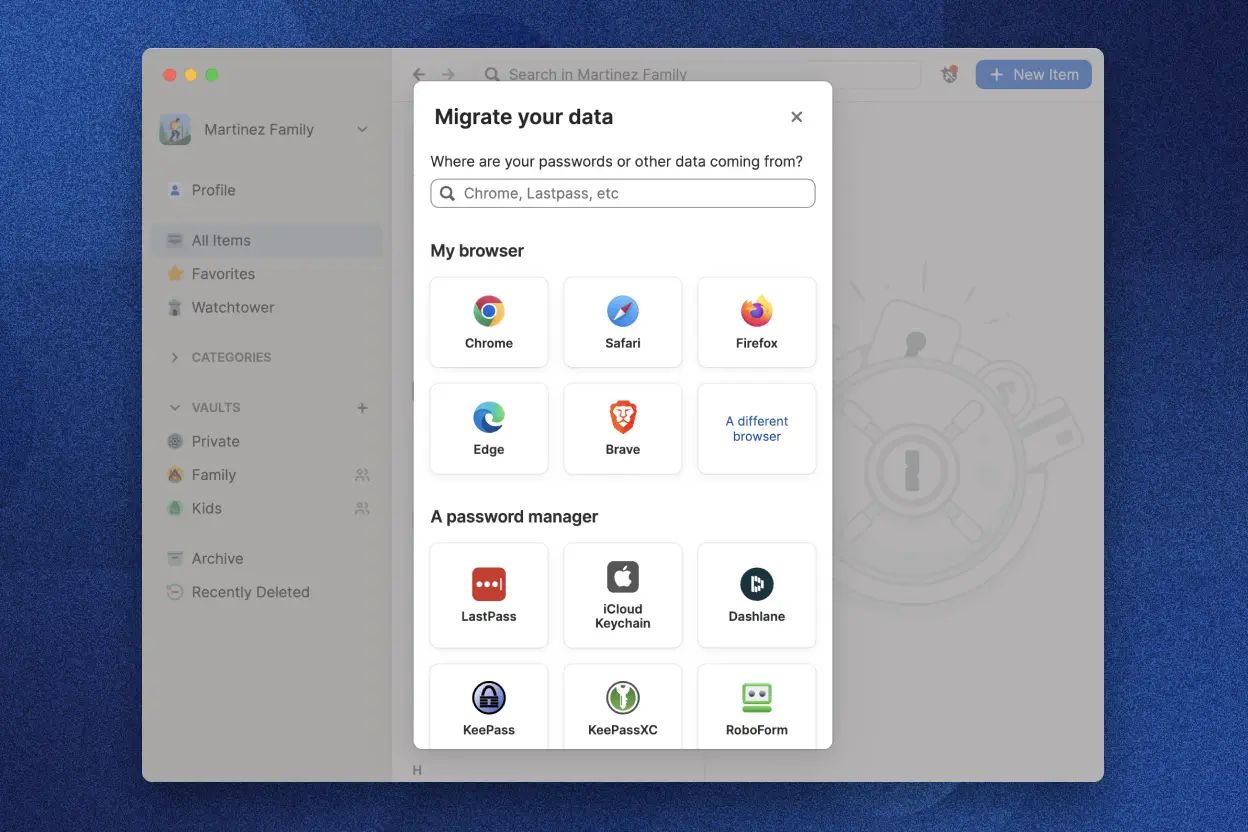
Yes, and it's fast. 1Password has one-click importers for LastPass, Bitwarden, Dashlane, Chrome, Safari, Firefox, Edge, the older 1Password 7 format, and generic CSV files. Most users finish a full migration in under 10 minutes. After importing, run Watchtower immediately — it will surface every weak, reused, or breached password in your imported set, and you can rotate them one at a time directly from the dashboard. We recommend deleting your account on the old service only after you've confirmed your imported data is complete and accessible.
Two safeguards apply. First, your vaults are stored locally on your devices, not just on 1Password's servers, so you'd retain a fully functional copy even if cloud sync vanished overnight. Second, you can export all data to a 1pux or CSV file at any time and import it into any other major password manager (Bitwarden, Dashlane, Proton Pass, etc.) in minutes. AgileBits is also a profitable, privately-held company with 20 years of operating history, so the going-out-of-business risk is low — but the data portability story means you're never locked in regardless.